

A good MVP app scope is not a shorter version of your dream product. It is the smallest mobile experience that can prove a real business assumption with real users.
That difference matters. Many founders start with a long feature list, ask developers for quotes and get wildly different estimates. The problem is not always the developer. Often, the scope is too vague for anyone to price or build responsibly.
For a non-technical founder, small business owner or local service company, scoping an MVP app should answer three practical questions:
-
What user problem are we solving first?
-
What is the minimum workflow needed to solve it?
-
What can wait until users prove they need it?
If you are still shaping the product idea itself, it may help to start with a broader guide on building a mobile app that users want before you commit to a build plan. Once you know the problem is worth solving, use the six steps below to turn the idea into a clear, buildable MVP scope.
What an MVP app scope should include
An MVP scope is a working agreement between the business goal and the first version of the app. It should be clear enough that a developer can estimate effort, spot risks and start building without guessing what you meant.
A useful MVP scope usually includes these pieces:
| Scope item | What it answers | Example |
|---|---|---|
| Business outcome | Why the app exists | Reduce manual appointment scheduling |
| Primary user | Who the first version serves | Field technician, patient, student or gym member |
| Core workflow | What the user must complete | Book, check in, upload, track or message |
| Must-have features | What must be built for the workflow to work | Login, request form, status updates |
| Technical constraints | What affects the build | iOS, Android, integrations, compliance |
| Launch criteria | What makes the MVP ready to test | Users can complete the main task without help |
The goal is not to remove ambition. The goal is to protect the first release from becoming too large to launch.
Step 1: Define one business outcome
Before listing features, write down the business outcome. This keeps your MVP app focused on a result instead of a collection of screens.
A weak outcome sounds like this: build an app for our customers. That could mean almost anything. A stronger outcome is specific: help customers request estimates from their phone, let patients complete intake forms before appointments or allow students to track study sessions and reminders in one place.
The outcome should be measurable enough that you can judge whether the MVP is useful after launch. For example, a plumbing business may want fewer missed service requests. A clinic may want less time spent chasing forms. A fitness startup may want to see whether users complete a workout plan for two weeks.
You do not need a perfect metric at this stage, but you do need a clear reason to build. Without that, every feature will feel important and the scope will expand quickly.
Step 2: Pick one primary user
Most first-time founders make the MVP too broad because they try to serve every possible user. Customers, admins, managers, vendors and staff all get pulled into the first version. That may be necessary later, but it rarely belongs in the first scope.
Choose the user whose problem matters most to proving the app. If your app helps a landscaping company manage field work, the primary user might be the crew lead. If your app helps a medical office collect intake details, the primary user might be the patient. If your app helps students study with reminders and progress tracking, the primary user might be the student preparing for exams.
Once you pick the primary user, write a short user statement:
A [specific user] needs to [complete a task] so they can [get a useful result].
This simple sentence becomes a filter. If a feature does not help that user complete that task, it probably belongs in a later version.
Step 3: Map the core workflow from start to finish
An MVP app is easier to scope when you think in workflows, not features. A workflow is the path a user follows to get value from the app.
For example, a booking app is not just calendar, notifications and profiles. The workflow may be: open the app, choose a service, select a time, confirm the booking and receive a reminder. That flow tells you what must exist for the app to be useful.
Keep the first workflow narrow. A good way to do this is to write the user journey in plain English before thinking about design or technology.
| App type | Core MVP workflow | Features that may support it |
|---|---|---|
| Field service app | Customer submits a job request and staff can review it | Request form, job status, basic admin view |
| Healthcare intake app | Patient submits required information before a visit | Secure form, consent checkbox, staff access |
| Fitness app | User follows a basic workout plan and tracks completion | Onboarding, workout list, progress history |
| Study app | Student creates a study plan and receives reminders | Task list, schedule, notifications |
Notice that the workflow comes first. Features are only included if they support the workflow.
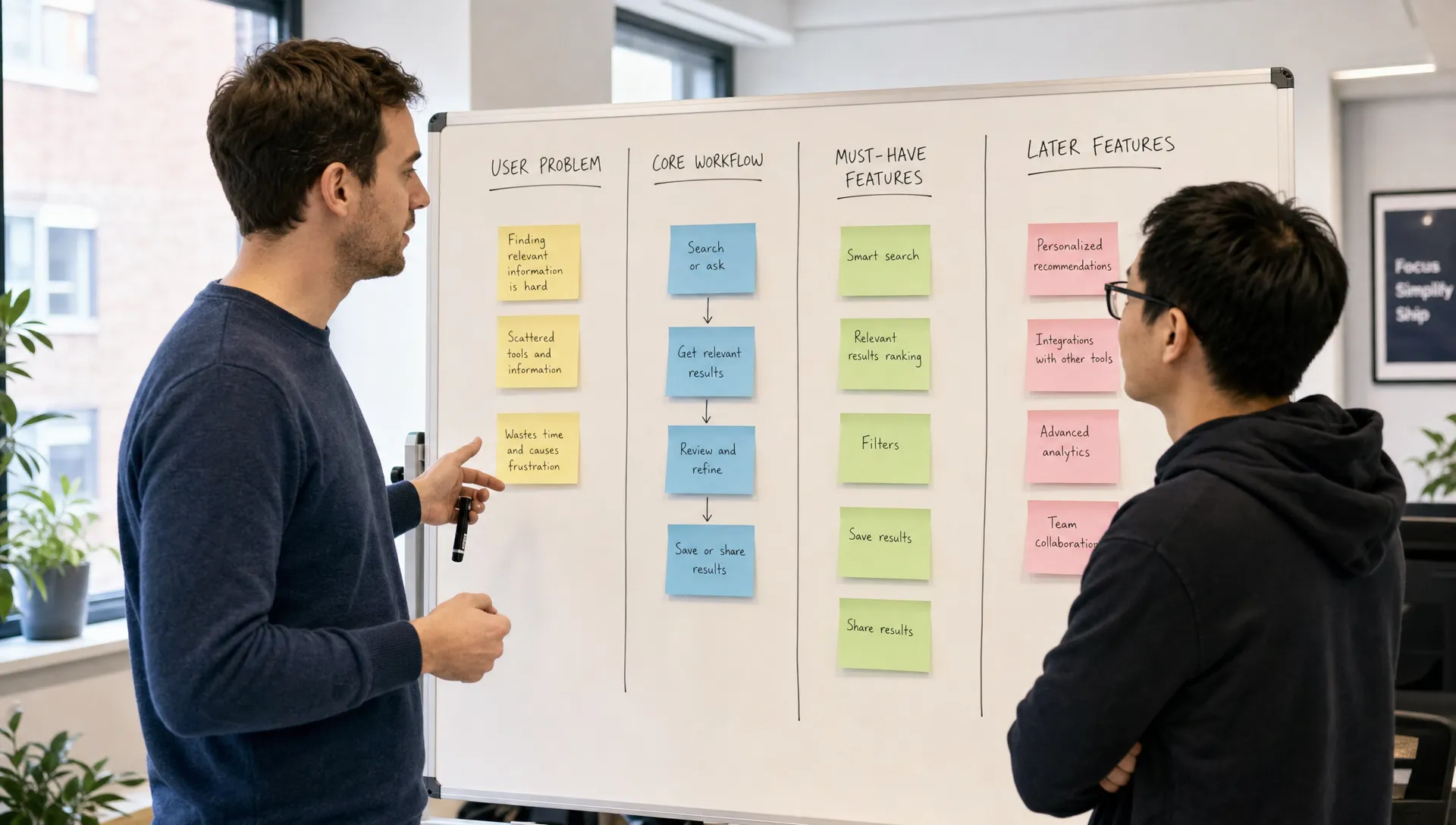
Step 4: Separate must-have features from later features
This is where your MVP scope gets smaller and stronger. Start with your full feature list, then label each item as build now, delay or remove.
A must-have feature is not something you personally like. It is something the first user needs to complete the core workflow. If users can still get the main value without it, it can wait.
| Feature question | Build now | Delay |
|---|---|---|
| Is it required for the main task? | Yes | No |
| Does the app fail without it? | Yes | No |
| Does it reduce a major user risk? | Yes | Maybe |
| Is it mainly for polish or convenience? | No | Yes |
| Is it needed for legal, security or compliance reasons? | Yes | No |
For example, user login may be required if the app stores personal data. Push notifications may be useful, but not always essential for the first release. Admin analytics may help later, but a basic admin view might be enough for launch.
Compliance is different from polish. If your MVP handles protected health information, payment data or sensitive personal information, privacy and security requirements cannot be treated as future enhancements. For healthcare apps in the United States, review official HIPAA guidance from HHS. If you serve users in the European Union or process EU personal data, the GDPR rules from the European Commission may apply.
Step 5: Decide the platform, data and integrations
After you define the workflow, decide what the app needs technically. This step prevents surprise costs during development.
Start with platform choice. Do you need iOS only, Android only or both? Local businesses often benefit from supporting both platforms because customers and staff may use a mix of devices. Startups sometimes begin with one platform if their early audience is concentrated there. If both platforms matter and speed is important, cross-platform development can reduce duplicate work. This guide on developing a cross-platform mobile app faster explains how scope, reusable components and smart technical choices affect delivery time.
Next, list the data your app must store. This may include user profiles, appointments, messages, photos, documents, payments or health information. The type of data affects authentication, database design, permissions, backup plans and compliance.
Then list integrations. Many MVPs depend on outside services such as payment processors, maps, calendar tools, SMS providers, email systems, analytics platforms or existing business software. Each integration adds complexity, so include only the ones needed for the first workflow.
A practical MVP technical note might look like this:
| Decision | MVP choice | Why it matters |
|---|---|---|
| Platform | iOS and Android | Field staff use mixed devices |
| Account access | Email login | Users need saved job history |
| Data | Job requests, photos and status | Core workflow depends on submitted details |
| Integrations | Email alerts only | Enough for first internal testing |
| Compliance | Privacy policy and role-based access | Personal customer data is stored |
You do not need to know how to implement all of this. You only need to identify what the app must handle so a developer can recommend the right architecture.
Step 6: Turn the scope into a build-ready brief
The final step is to write a brief that a developer can actually use. This does not need to be a 40-page document. In fact, a clear five-page brief is usually better than a huge document full of assumptions.
Your brief should include:
-
The business outcome
-
The primary user
-
The core workflow
-
The must-have feature list
-
Any screens you already know are needed
-
Data that must be stored or protected
-
Required integrations
-
Compliance concerns
-
Launch criteria
-
Features intentionally saved for later
The last item is important. A good scope says what you are not building yet. This gives you room to improve the app after real user feedback instead of trying to predict every feature upfront.
If you are hiring help, your brief should also make it easier to compare developers. You are not just asking who can code. You are looking for someone who can understand the product goal, challenge risky assumptions and build the first version cleanly. This article on choosing a mobile app developer for your startup covers what to look for before you commit.
Common MVP scoping mistakes to avoid
The most expensive MVP mistakes usually happen before development starts. A few are especially common.
One mistake is copying a large competitor feature for feature. Established apps have years of product decisions behind them, and many of their features are not needed to test your first assumption.
Another mistake is treating design as decoration. For an MVP, design should make the core workflow obvious. A simple app that users understand is more valuable than a polished app that makes the main task confusing.
A third mistake is leaving admin needs out of the scope. If your business needs to review submissions, manage bookings or respond to requests, the MVP may need a basic admin interface. It does not need to be fancy, but someone must be able to operate the product after users take action.
The final mistake is delaying security decisions. Authentication, permissions, data storage and privacy requirements shape the build from the start. Adding them later can be slower and more expensive than scoping them correctly in the first place.
A simple MVP app scoping template
Use this quick template before speaking with a developer:
| Section | Your answer |
|---|---|
| App idea | What are you building? |
| Business goal | What should improve after launch? |
| Primary user | Who uses version one? |
| Main action | What must the user complete? |
| Success signal | How will you know it worked? |
| Build now | Which features are essential? |
| Build later | Which features can wait? |
| Risks | What could block launch? |
| Compliance | Are there privacy, healthcare or data rules? |
| Platforms | iOS, Android or both? |
If you can fill this out clearly, you are much closer to a realistic estimate and a faster build.
Ready to scope your MVP app?
If you have an app idea but are not sure what belongs in version one, a short scoping conversation can save weeks of rework. I build iOS and Android apps for startups and clients, with a focus on cross-platform development, clean code, fast MVP delivery, and a strong user experience.
You can see my work or book a consultation to turn your idea into a practical MVP scope before development begins.