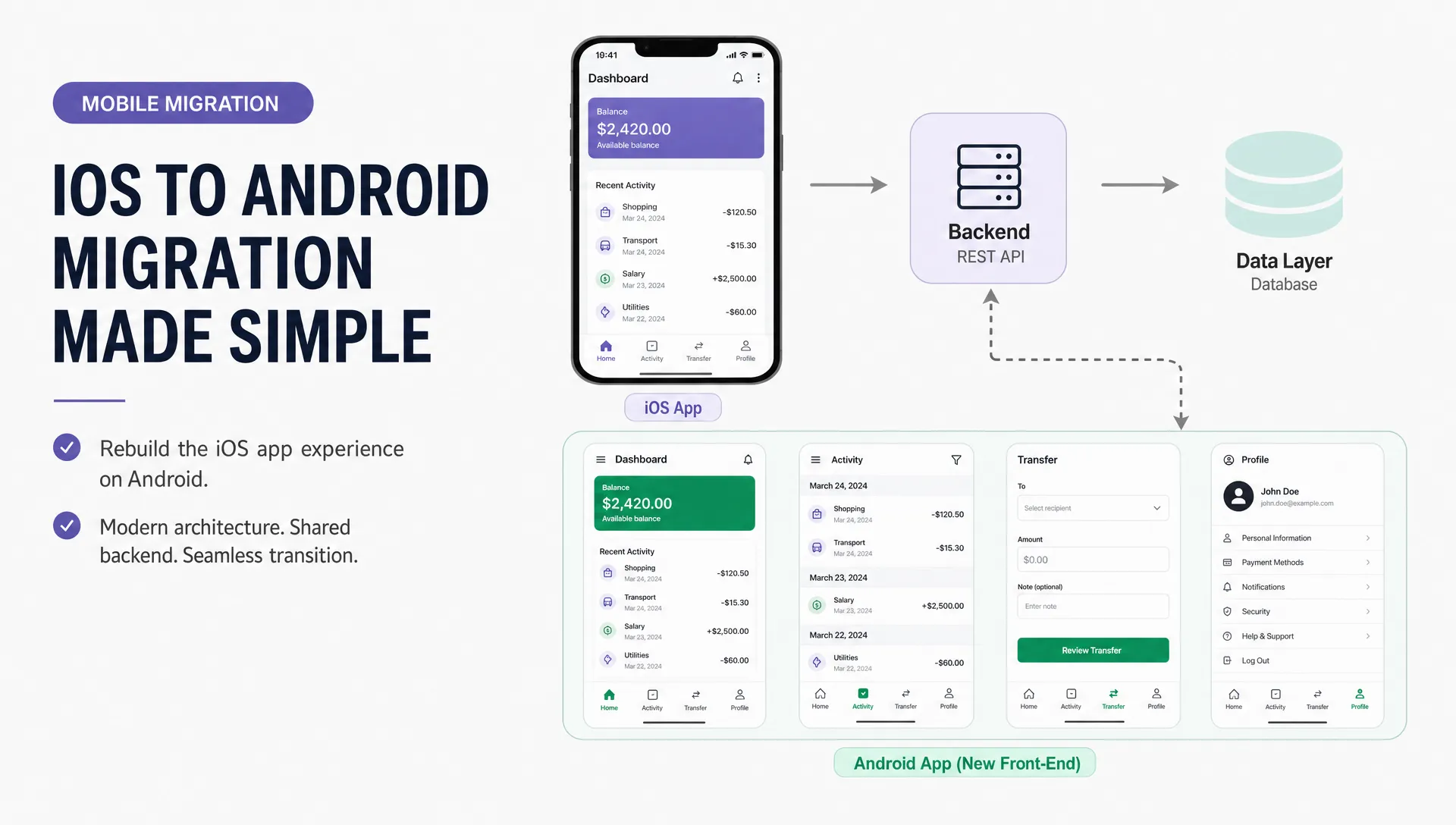

Expanding from iOS to Android can open your app to a much larger user base, but it often creates one big fear for founders: do we have to rebuild the whole thing from scratch?
The short answer is no, not if the iOS app was built with a usable backend, clear product logic and a focused feature set. But there is also no safe one-click conversion from a native Swift or SwiftUI app into a clean Android app. An iOS to Android app migration is less about copying code and more about reusing the right assets while rebuilding the parts that must be native to Android.
For a startup founder, local business or healthcare software owner, this distinction matters. Starting over wastes budget. Copying the iOS app blindly creates a clunky Android experience. The best path is usually a controlled port: keep the product learning, backend, data model and core workflows, then build the Android front end with Android users in mind.
First, understand what can actually be reused
Native iOS apps and Android apps are built on different platform stacks. A typical iOS app may use Swift, SwiftUI, UIKit, Apple Push Notification service, Apple Sign In, StoreKit and iOS-specific interface patterns. A native Android app may use Kotlin, Jetpack Compose, Android notification APIs, Google Play Billing and Android permission patterns.
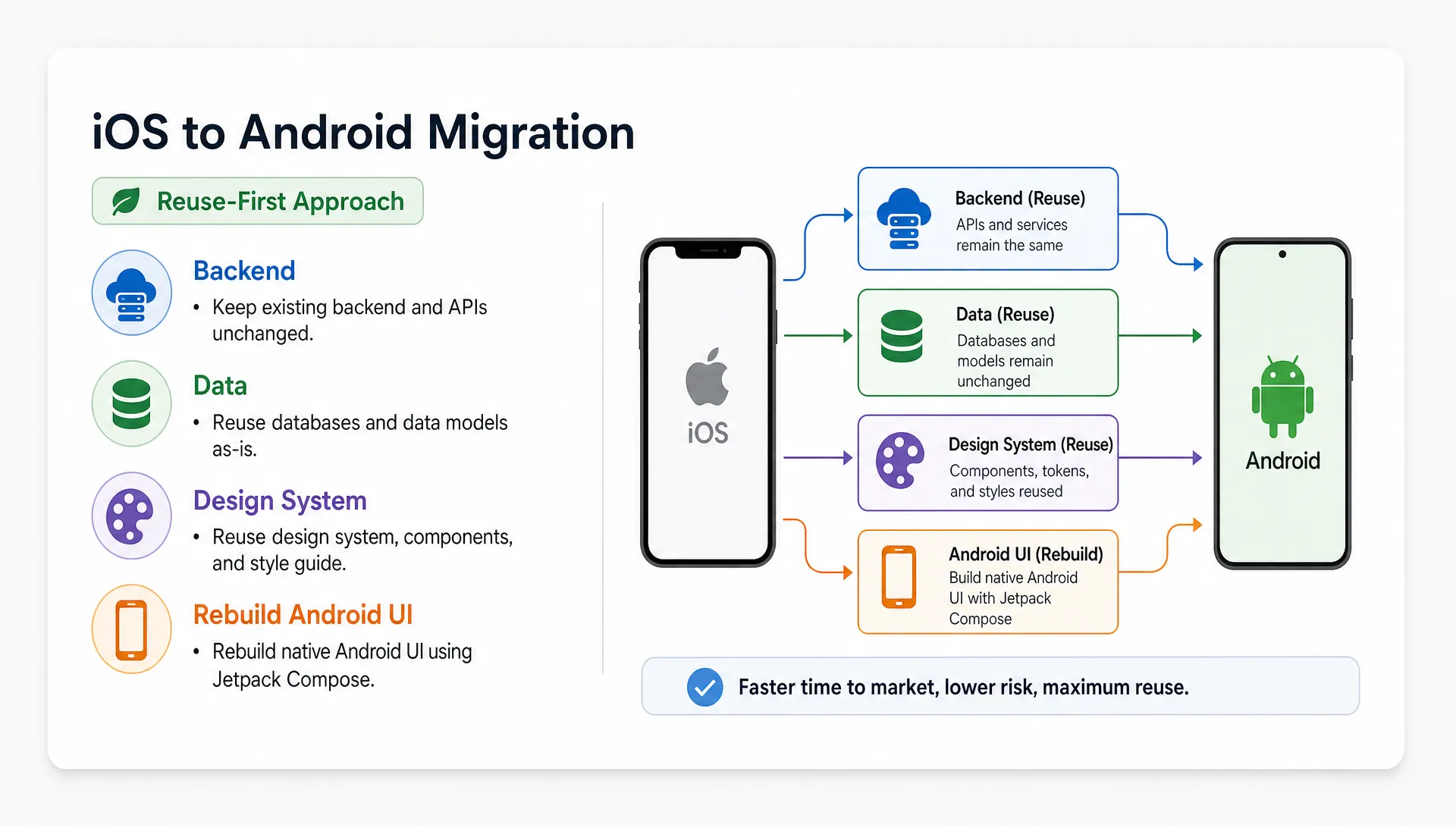
That means the user interface code usually cannot be reused directly. The opportunity is in everything around that code.
| App asset | Can it usually be reused? | What to check before Android development |
|---|---|---|
| Backend APIs | Yes | Confirm endpoints are stable, documented and not tightly coupled to iOS behavior |
| User accounts and database | Yes | Check authentication, user IDs, subscriptions, consent records and data migration needs |
| Product flows | Mostly | Keep proven flows, but adapt gestures, navigation and permissions for Android |
| Visual brand and design system | Mostly | Reuse colors, typography and components, but translate them into Android-friendly UI |
| Business logic | Sometimes | Logic may be reused as specifications, tests or shared modules, but not always as code |
| iOS screens | No, in most native apps | Rebuild screens in Kotlin, Jetpack Compose or a cross-platform framework |
| Analytics events | Yes | Keep event names consistent so iOS and Android data can be compared |
| Third-party integrations | Often | Check whether each service has a mature Android SDK and different setup requirements |
The more your app depends on a clean backend, the less you need to redo. The more logic is trapped inside iOS screens, the more discovery and refactoring you will need before Android can move quickly.
Audit the iOS app before writing Android code
A rushed port usually begins with a developer opening the iOS app and trying to recreate every screen. That feels productive for the first week, then slows down when hidden dependencies appear: undocumented APIs, hardcoded payment logic, missing edge cases, unclear analytics and screens that nobody uses anymore.
Before building, run a short migration audit. The goal is to separate what is proven from what is merely present.
A useful audit should answer these questions:
- Which iOS features are actively used and which can be dropped from the Android launch?
- Does the app have a backend, or is important data stored only on the device?
- Are APIs documented well enough for another client app to use them?
- Which third-party services need Android configuration, SDK keys or store-specific approval?
- Are there privacy, HIPAA, GDPR or consent requirements that must be handled differently on Android?
- What does the Android MVP need to do on day one for users to trust it?
This is also a good time to question scope. If your iOS app grew over several releases, the Android version does not need to include every secondary setting, experimental feature or low-usage screen. If the product is still early, it may help to revisit the same discipline used when building a mobile app that users want: define the core user outcome first, then build only what supports it.
Choose the right migration path
There are several ways to move an iOS app to Android without starting over. The right choice depends on your current codebase, budget, roadmap and how similar both apps need to remain over time.
| Migration path | Best for | Main tradeoff |
|---|---|---|
| Native Android port | Existing iOS app works well and you want the best Android experience | You rebuild UI and platform code separately |
| Cross-platform rebuild | You want one shared codebase for iOS and Android going forward | You may need to rebuild parts of the existing iOS app too |
| Shared backend with separate apps | You have a strong backend and want platform-specific front ends | Requires discipline to keep features and analytics aligned |
| Automated code conversion | Rarely a good fit for production apps | Output is often hard to maintain and still needs major rewriting |
For many founders, the strongest option is a shared backend with a new Android app. It avoids throwing away the iOS app while giving Android users a product that feels native. If the iOS app itself needs a major rebuild, then a cross-platform approach may make sense. In that case, it is worth comparing the practical steps to develop a cross-platform mobile app faster before committing to separate native apps.
Avoid basing the decision only on short-term cost. A cheaper migration that creates two messy codebases can become expensive after launch, especially when you need bug fixes, feature parity, analytics consistency or compliance updates.
Treat the backend as the bridge between iOS and Android
The backend is usually the most important reusable part of the migration. If your iOS app already connects to APIs for login, profiles, content, bookings, orders, messages or health records, Android should use those same APIs instead of creating a parallel system.
That shared backend gives you several advantages. Users can log in with the same account. Your team can view analytics across platforms. Admin tools do not need to be duplicated. Business rules stay consistent. Data privacy controls are easier to manage because there is one source of truth.
Before Android development starts, the backend should be checked for platform assumptions. For example, an endpoint may expect an iOS device token, an App Store receipt, an iCloud-specific identifier or an Apple-only push notification format. Those assumptions do not mean you need a new backend, but they do need to be cleaned up.
For subscriptions and purchases, be careful. App Store and Google Play billing systems are different. If your app unlocks paid features, the entitlement logic should usually live server-side so your backend can understand whether a user has access, regardless of platform. You still need to follow the rules of each store, but your app should not depend on scattered payment checks inside individual screens.
Translate the user experience, do not clone it
A common mistake is treating Android as a pixel-for-pixel copy of iOS. Users may not describe the difference in technical terms, but they notice when an app ignores Android conventions.
Android users expect certain patterns around back navigation, bottom sheets, permissions, notifications, sharing, file access and system settings. Google publishes Android app quality guidance and Material Design resources that can help teams avoid obvious platform mismatches.
This does not mean your Android app should look like a different brand. It means the same product should feel at home on Android. Your colors, tone, content hierarchy and core flows can remain consistent, while navigation, components and permission timing are adapted.
For example, an iOS onboarding flow may ask for notifications early because that worked well with your first user base. On Android, the same timing may feel intrusive depending on the use case. A field service app may need location permission only when a technician starts a job. A healthcare app may need to explain why sensitive data is being collected before asking for access. A lead generation app may need a faster first action before any account creation.
The Android version should preserve the intent of the iOS experience, not every interaction detail.
Build the Android version as a focused MVP
If your iOS app has been live for a while, you have an advantage: real usage data. Use it to decide what the Android launch actually needs.
Many Android ports fail because the team tries to ship the entire iOS history at once. The better approach is to create an Android MVP that includes the core loop, account access, critical settings, analytics, support paths and the minimum features users need to succeed.
For a fitness app, that may be workout discovery, workout tracking and progress history. For a study app, it may be content access, AI-assisted study sessions and saved progress. For a trades or field service app, it may be job details, photos, customer notes and status updates. For healthcare software, it may be secure login, patient data access, audit-friendly workflows and consent handling.
The Android MVP should not feel incomplete, but it should be intentionally smaller than the full iOS app if many iOS features are not essential for first release.
Keep analytics consistent across both platforms
If iOS and Android use different analytics names for the same behavior, you will struggle to understand product performance after launch. This is especially painful for startups that need to compare activation, retention, conversion or lead quality across platforms.
Before Android development, define a shared event tracking plan. The plan should name key events, describe when each event fires and identify which properties are required. Keep it small at first. A bloated analytics plan is easy to ignore and hard to debug.
The most useful events usually map to the user journey: account created, onboarding completed, first core action, repeat core action, payment started, payment completed, support requested and account deleted. Your exact events depend on the app, but the principle is the same. If the business question matters, track it consistently.
This also helps Android development stay focused. When the team knows which actions define success, it becomes easier to prioritize screens and avoid rebuilding features that do not move the product forward.
Recheck privacy, security and compliance on Android
Moving from iOS to Android is not just a design and code exercise. If your app handles personal data, healthcare information, location data, messages, payments or customer records, privacy and security need to be reviewed on the Android side too.
For healthcare software, HIPAA and GDPR concerns should be addressed before implementation, not patched later. That includes data minimization, consent, access control, encryption, logging, user deletion workflows and vendor agreements where required. Android permissions should be requested only when needed and explained in plain language.
For small businesses and field service teams, security still matters even if the app is not in a regulated industry. Customer addresses, job photos, invoices, messages and lead data can be sensitive. A clean Android app should protect that data through secure authentication, safe storage choices and careful handling of offline states.
If trust is a major part of your product, the Android version should be built with the same care described in this guide to build a clean Android app users trust. Users do not judge security only by encryption. They also judge it by how clear, stable and respectful the app feels.
Test on real Android conditions
Android testing needs a different mindset than iOS testing. There are many device sizes, manufacturers, OS versions and performance profiles. A screen that looks perfect on one phone can break on another. A background task that works on a high-end device may fail on a budget phone with strict battery settings.
At minimum, test the Android app across different screen sizes, slower devices, weak networks and interrupted sessions. If your app depends on the camera, GPS, Bluetooth, push notifications, file uploads or offline mode, those flows deserve extra attention.
A sensible test plan should cover:
- Core user journeys from install to first successful action
- Login, logout, password reset and account deletion
- Push notifications and permission states
- Payment or subscription flows if used
- Offline, poor network and retry behavior
- Crash reporting and analytics validation
- Accessibility basics such as readable text, contrast and tap targets
Do not wait until the end to test on real devices. Android issues are cheaper to fix when they are caught during development, not after the Google Play release.
Plan the launch in phases
The safest Android launch is usually phased. Start with internal testing, then a small beta group, then a wider release. If your iOS users have requested Android support, invite a small group of them or their teams to test the first version. They already understand the product, so they can spot missing workflows quickly.
Before launch, prepare store assets, support documentation, release notes and a feedback channel. Also decide how you will handle feature parity after release. Some features may launch on iOS first, some on Android first and some on both together. Without a simple release policy, the two apps can drift until support becomes difficult.
A phased launch is especially useful for operational apps used by local businesses, healthcare teams or field workers. If the app supports daily work, a broken release can disrupt real jobs. A smaller rollout lets you catch workflow issues before they affect every user.
What not to reuse
Reusing the right assets saves money. Reusing the wrong assets creates technical debt. Do not carry over old assumptions just because they exist in the iOS app.
Avoid copying unused features, confusing onboarding, outdated designs, hardcoded business rules, old analytics events and iOS-specific workarounds. If users complained about a flow on iOS, Android is your chance to fix it. If the iOS app has a messy feature that only one early customer requested, reconsider whether it belongs in the Android MVP.
The goal is not to make Android a second-class version. The goal is to use what you have learned from iOS to launch Android with less waste and more confidence.
A practical iOS to Android migration checklist
Before you hire a developer or start the Android build, make sure these pieces are clear:
| Area | What should be ready |
|---|---|
| Scope | A short list of Android launch features based on real user needs |
| Backend | API access, documentation, test accounts and known platform assumptions |
| Design | Updated Android-friendly flows, not only iOS screenshots |
| Data | Account, subscription, privacy and migration rules |
| Integrations | Android SDK availability for payments, analytics, messaging and notifications |
| Compliance | HIPAA, GDPR or industry-specific requirements reviewed early |
| Testing | Device matrix, beta plan, crash reporting and analytics validation |
| Launch | Google Play assets, support plan, release notes and feedback process |
If several rows are unclear, pause before writing production Android code. A few days of planning can prevent weeks of rework.
Plan Your Android Version Without Rebuilding the Wrong Things
Moving an iOS app to Android is not about starting over. It is about knowing what to keep, what to rebuild and what to improve before you reach a new platform.
If you already have an iOS app and want a clean Android version, I build iOS, Android and cross-platform mobile apps for startups and clients. For a focused migration or MVP, you can book a consultation call to review your app, scope the Android launch and choose the development path that avoids unnecessary rebuilds.