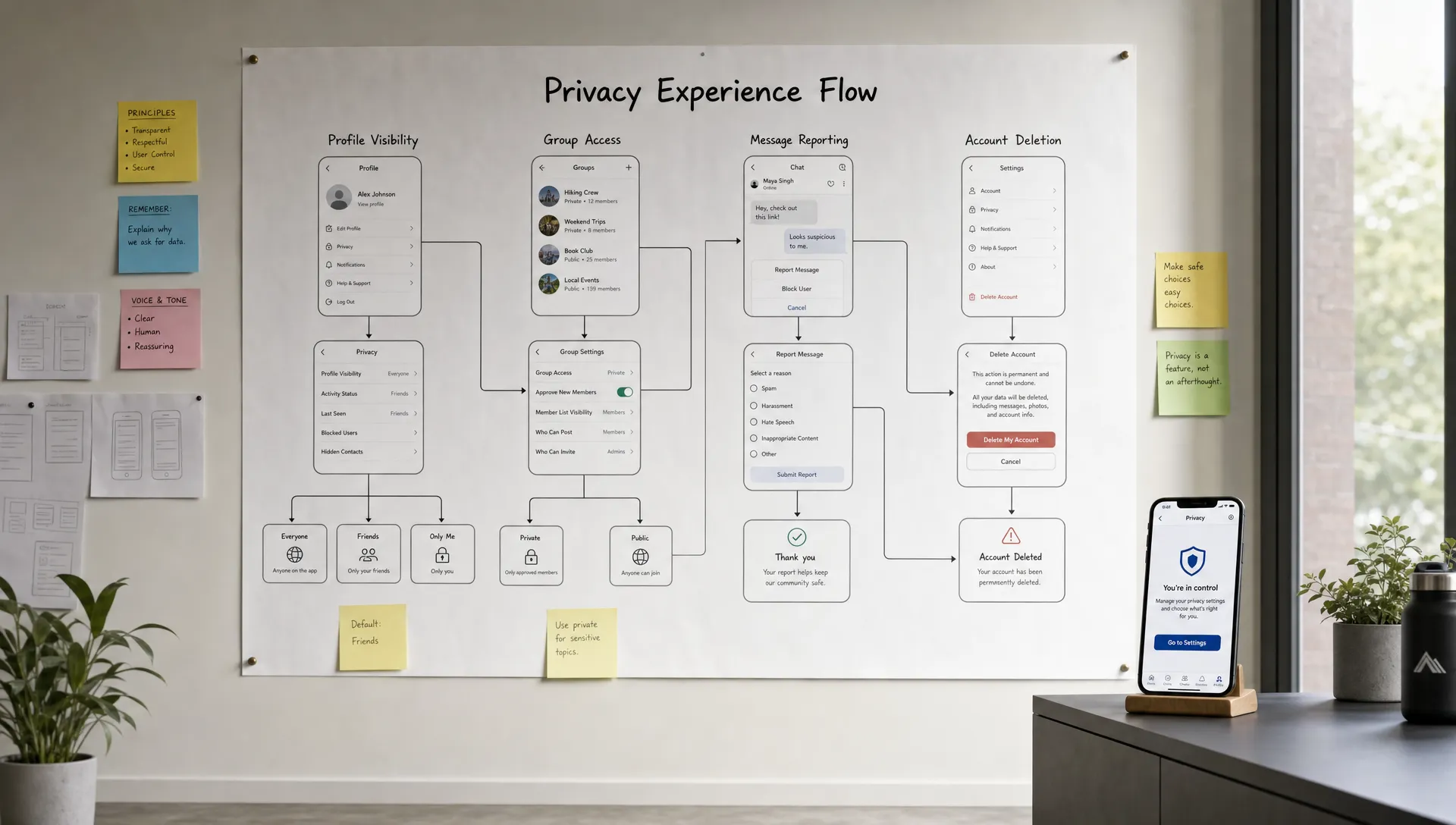

A social app is not just a set of profiles, feeds, likes, and messages. It is a place where people reveal preferences, relationships, routines, locations, opinions, and sometimes sensitive personal details. That makes privacy more than a legal checkbox. For a social product, privacy is part of the user experience.
Founders often feel a tradeoff: build rich social features or protect user data. In reality, the best social app MVPs do both by being deliberate about what data they collect, how they explain it, and which features are worth launching now versus later.
If you are a non-technical founder planning a social app, the goal is not to build a perfect privacy system on day one. The goal is to make privacy part of the product scope from the beginning, so you avoid expensive rebuilds, user backlash, and app store issues later.
Why privacy matters so much in a social app
Every mobile app handles user data, but social apps handle data that becomes meaningful through relationships. A fitness app might store workouts. A marketplace might store purchases. A social app often stores who people know, what they share, who they talk to, where they spend time, and what content they engage with.
That creates three major risks.
First, users can be harmed if private interactions become public or searchable by default. Second, growth tactics like contact syncing and recommendation algorithms can feel invasive if they are not clearly explained. Third, privacy mistakes compound quickly because social apps rely on trust. If early users feel exposed, they will not invite others.
This is why privacy should be treated as a product requirement, not a legal document added right before launch. The FTC has repeatedly emphasized that businesses should be clear about data practices and protect the personal information they collect. For startup founders, that advice translates into a simple principle: do not collect data unless it creates clear value for the user and you can protect it responsibly.
Start with privacy-by-design, not privacy-by-policy
A privacy policy matters, but it does not make a social app private. Privacy-by-design means the app is planned, designed, built, and tested with privacy in mind.
For an MVP, privacy-by-design usually comes down to a few practical decisions:
-
Collect the minimum data needed for the core experience.
-
Make sensitive sharing optional instead of mandatory.
-
Keep privacy settings simple enough for real users to understand.
-
Avoid public defaults when the consequence could surprise users.
-
Give users clear ways to delete, hide, or control their data.
This approach also helps you ship faster. When you remove unnecessary data collection and avoid complicated features too early, the MVP becomes leaner. If you are still defining what belongs in your first version, the planning process in building a mobile app that users want is a useful companion to privacy-focused scoping.
Define the social app’s core interaction before collecting data
The most common privacy mistake in social app development is collecting data “just in case.” Founders may want birthdays, photos, interests, contacts, location, job titles, schools, device IDs, and behavioral analytics from day one because large social platforms do it.
But your MVP should not copy mature platforms. It should prove one core social behavior.
Ask this first: what is the smallest social loop that makes the app valuable?
For example, your app might be built around one of these loops:
| Social app concept | Core loop | Data you may need for MVP | Data to avoid unless essential |
|---|---|---|---|
| Local community app | Join a group, post updates, reply | Name or nickname, general area, group membership | Precise location history, full address book |
| Study companion app | Find peers, share progress, encourage each other | Profile name, study goals, progress status | School records, private grades, unrelated device data |
| Fitness social app | Share workouts, react, follow friends | Profile, workout summary, follow graph | Continuous location, health details not used by the feature |
| Creator community app | Post content, follow creators, comment | Username, content, engagement activity | Contact uploads, demographic profiling |
| Field team social app | Coordinate updates between staff | Role, team, messages, job updates | Personal contacts, off-duty tracking |
This exercise reveals what you actually need. If the app’s first version is about private groups, you may not need a public discovery feed. If the app is about accountability between friends, you may not need contact syncing at launch. If the product is for local businesses, you may only need team-based access, not consumer-style follower graphs.
Build safer profiles from the beginning
Profiles are the identity layer of a social app, so they deserve careful attention. Many founders treat profiles as simple UI, but privacy decisions often start here.
A privacy-conscious profile system should separate account identity from public identity. The account may need an email address or phone number for login, but the public profile might only show a display name, avatar, and chosen bio. Users should not be forced to reveal legal names unless the app truly requires it.
For most social app MVPs, safer profile defaults include:
-
Display name instead of full legal name.
-
Optional profile photo.
-
Optional bio and interests.
-
Clear visibility settings for profile fields.
-
Private-by-default fields for email, phone number, and date of birth.
If your app depends on trust, such as professional networking, local services, or verified communities, you may need verification. Even then, verification data does not always need to be public. A user can be verified without exposing the document, phone number, or private details used during verification.
Be careful with contact syncing and friend discovery
Friend discovery can help a social app grow, but it is one of the most sensitive areas of mobile privacy. Uploading a user’s address book can expose data about people who never signed up for your app. It can also surprise users if you recommend connections they did not expect.
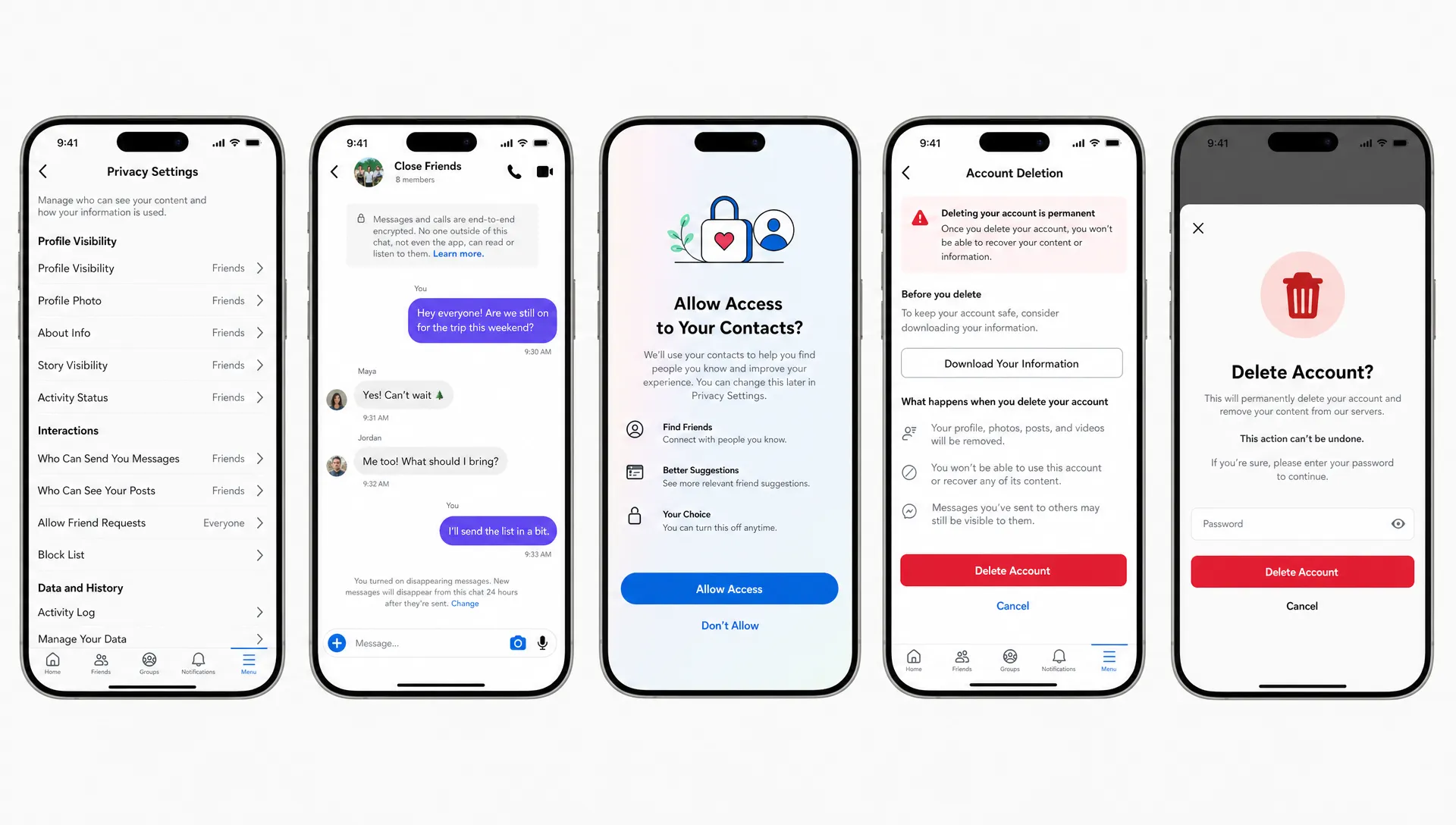
If you include contact discovery, make it explicit and limited. Explain why you need access, what will happen next, and whether contacts are stored. Better yet, consider MVP alternatives before requesting address book access.
Invite links, invite codes, QR codes, username search, and private group links can all support growth without uploading a user’s entire contact list. These methods are often enough for an early MVP, especially when the social graph starts inside a specific niche or community.
Apple and Google also expect apps to be transparent about data use. Apple’s App Privacy Details and Google Play’s Data safety section are not just paperwork. They force you to document what data you collect, why you collect it, and whether it is linked to the user.
Design messaging and private groups with realistic security
Private messaging, direct messages, and closed groups create strong engagement, but they also raise user expectations. If you call something private, users assume it is protected from outsiders, searchable only by intended participants, and not exposed accidentally through notifications or previews.
For an MVP, the right level of security depends on the product. A casual community app may not need advanced encryption architecture in its first release, but it still needs secure login, encrypted network communication, protected database access, and careful permission checks. A sensitive app involving health, minors, workplace issues, or vulnerable communities may need stronger protections and legal review from day one.
Do not promise end-to-end encryption unless it is actually implemented and tested. It is better to say less and protect data well than to overclaim. If privacy is a key differentiator, encryption architecture should be discussed early with the developer because it affects search, moderation, backups, message recovery, and reporting.
Keep feeds and recommendations transparent
Feeds are where many social apps become privacy-heavy. The more personalized a feed becomes, the more behavioral data the app may collect. That does not mean you should avoid personalization. It means users should understand the basics of why they see certain content and have some control.
For an MVP, you can often start with simpler feed logic. Recent posts from joined groups, followed users, or selected interests may be enough. You do not always need complex ranking, hidden scoring, or aggressive engagement tracking in the first version.
A privacy-conscious feed can include clear controls such as mute, unfollow, hide post, leave group, and report content. These controls protect user comfort while giving you product signals. If many users mute a topic or leave a group, that tells you something without needing invasive tracking.
Founders often worry that privacy will reduce retention, but the opposite can be true. Thoughtful features like personalized onboarding, saved history, and reminders can support repeat use without crossing privacy lines. For related product ideas, see these companion app features that keep users coming back.
Use analytics without turning users into surveillance targets
You need analytics to improve a social app. Without them, you cannot understand activation, retention, feature usage, or where users drop off. The privacy question is not whether to use analytics. It is how much data you need and whether it is tied to identifiable users.
For an MVP, focus on product metrics that answer practical questions:
-
Do users complete onboarding?
-
Do they create or join a first social space?
-
Do they post, comment, react, or message?
-
Do they return after the first day and first week?
-
Which screens cause confusion or abandonment?
You can often answer these without collecting excessive personal data. Avoid recording message contents, private notes, exact location trails, or unnecessary profile attributes in analytics tools. If you use third-party analytics, understand what data is sent, where it is stored, and whether users should be able to opt out.
A simple rule helps: analytics should explain product behavior, not expose personal lives.
Build moderation without exposing private data unnecessarily
Every social app needs a moderation plan, even if the MVP is small. Abuse, spam, harassment, impersonation, and inappropriate content can appear earlier than founders expect. However, moderation systems also handle sensitive reports and private context.
A good MVP moderation flow includes user reporting, blocking, content removal, and admin review tools. But admin access should be limited. Not every team member should be able to read private conversations or inspect user profiles. Access should match the role, and sensitive actions should be logged.
If users can report private messages, design the reporting flow so they understand what is shared with moderators. For example, reporting a message may send the reported message and nearby context for review. That is very different from giving moderators unrestricted access to entire conversations.
This is an area where product trust and safety overlap with privacy. Clear reporting flows protect the community while reducing unnecessary exposure.
Make deletion and data control part of the MVP
Many founders delay account deletion, export, and privacy controls because they seem like “settings” rather than core features. That is risky. Users increasingly expect control over their data, and regulations may require it depending on where users live.
The European Union’s General Data Protection Regulation gives people rights related to access, correction, deletion, and portability in many situations. In the United States, privacy rules vary by state and sector, and California’s privacy laws may be relevant for some businesses. This is not legal advice, but it is a reminder that deletion and access are not nice-to-have features for many apps.
At minimum, a social app MVP should define what happens when a user deletes their account. Will their posts disappear, become anonymized, or remain in group threads? What happens to comments, reactions, messages, media, and reports? The answer should be designed intentionally because it affects both privacy and community continuity.
Here is a practical way to think about it:
| Data type | Privacy consideration | MVP decision to define |
|---|---|---|
| Profile data | Directly tied to identity | Delete or anonymize on account deletion |
| Public posts | May affect other users’ conversations | Delete, anonymize, or retain with clear policy |
| Private messages | Expected to be confidential | Define retention and deletion behavior carefully |
| Media uploads | Can reveal people, places, and metadata | Strip unnecessary metadata and remove when deleted |
| Reports and safety logs | Needed for abuse prevention | Retain only as long as justified and restrict access |
| Analytics events | May be linked to behavior | Aggregate or detach from identity where possible |
The key is consistency. Users should not delete their account and later discover that personally identifying data is still visible in unexpected places.
Reduce risk with smart technical architecture
Privacy is not only about product screens. It is also about how the app is built.
For a social app MVP, the technical foundation should include secure authentication, encrypted traffic, database rules or server-side authorization, protected file storage, and separation between public and private data. If the app has roles, such as user, group admin, moderator, and platform admin, each role should have carefully limited permissions.
Push notifications also deserve attention. A notification preview can leak private information on a lock screen. For sensitive messages or group activity, consider generic notification text such as “You have a new message” rather than showing full content.
Media uploads are another hidden risk. Photos and videos may include metadata, including location data in some cases. Your app should avoid storing or exposing metadata that is not needed for the user experience.
This is where choosing the right developer matters. A privacy-aware mobile developer will ask about data models, permissions, roles, retention, and edge cases before writing screens. If you are comparing options, this guide on how to choose a mobile app developer for your startup can help you evaluate more than just hourly rates.
Validate privacy expectations with real users
Founders often guess what users will find acceptable. That is dangerous because privacy expectations vary by audience and context.
A college social app, a neighborhood app, a professional networking app, and a field service team app all require different privacy defaults. Teenagers, parents, employees, creators, and local business owners may have different comfort levels around visibility and discoverability.
Before development, test privacy assumptions in user interviews. Ask questions like:
-
What information would you be comfortable showing publicly?
-
Who should be able to find your profile?
-
Would you want posts to be searchable outside the group?
-
Would you use contact syncing if it were optional?
-
What would make you stop trusting the app?
These questions often reveal product opportunities. For example, users may want temporary posts, anonymous participation, private circles, or invite-only spaces. Those features are not just privacy features. They can become reasons people choose your social app over larger platforms.
A privacy-first MVP checklist for social app founders
Before you begin development, review your first version against this checklist. You do not need every advanced privacy feature on day one, but you should have clear answers for the basics.
| Area | Question to answer before development |
|---|---|
| Core value | What social behavior are we proving in the MVP? |
| Data collection | What data is required, optional, or unnecessary? |
| Profiles | Which fields are public, private, or user-controlled? |
| Discovery | Can users grow their network without full contact upload? |
| Messaging | What level of privacy and security do users expect? |
| Groups | Who can join, view, post, invite, and moderate? |
| Analytics | Which events are needed without exposing sensitive content? |
| Moderation | How can users report abuse without overexposing private data? |
| Deletion | What happens to profiles, posts, messages, media, and logs? |
| App stores | Can you accurately complete Apple and Google data disclosures? |
This checklist can become part of your product brief. It gives your designer and developer clearer constraints, reduces ambiguity, and prevents late-stage privacy surprises.
Common mistakes to avoid
Many privacy problems in social apps come from avoidable early decisions. The biggest one is making everything public by default because it seems better for growth. Public content can help discovery, but only when users understand what is visible and where it may appear.
Another mistake is copying large social networks too closely. Mature platforms have legal teams, trust and safety teams, infrastructure, and years of privacy tooling. An MVP needs focus. Building a smaller, more trustworthy social space is usually more realistic than launching with every growth mechanic at once.
A third mistake is hiding important controls deep in settings. If a user is about to post publicly, join a visible group, sync contacts, or share location, the privacy choice should appear at the moment it matters.
Finally, do not treat compliance as something to “figure out later.” Even if you are building a lean MVP, basic privacy decisions affect architecture. Retrofitting privacy after launch can be slower and more expensive than building the right foundation early.
Build trust into your social app from day one
A social app grows when users feel safe enough to participate and invite others. That trust does not come from a long privacy policy alone. It comes from thoughtful defaults, clear controls, responsible data collection, secure development, and a product scope that respects the user.
If you are planning a privacy-conscious social app MVP, start with the smallest valuable social loop, decide what data it truly needs, and build privacy into the core experience before launch. For founders who want help turning that idea into an iOS and Android MVP, I can build cross-platform mobile apps with a focus on clean code, user experience, and fast MVP delivery.
You can see my work or book a consultation.