

A companion app is not just a smaller version of your website. It is the part of your product, service, or business that stays close to the user during the moments that matter, such as a workout, study session, appointment, job site visit, class, purchase, or daily routine.
For founders and small business owners, this is where retention is won. Users may download an app because it sounds useful, but they come back when it becomes part of their rhythm. The best companion app features reduce friction, create timely value, and give people a reason to return without feeling nagged.
That matters even more for MVPs. If you are building your first version, you do not need a bloated feature list. You need a tight set of behaviors that help users form habits, complete tasks, and see progress. Below are the features that make a companion app worth opening again and again.
What makes a companion app different?
A companion app supports an ongoing relationship between the user and a goal, service, device, product, or community. It often works alongside something else, rather than replacing it.
For example, a companion app might support:
-
A fitness program with workout tracking, reminders, and progress milestones
-
A tutoring or study service with flashcards, lesson notes, and AI-assisted review
-
A field service business with job checklists, customer details, and photo uploads
-
A local business membership with booking, loyalty rewards, and updates
-
A social or community product with messaging, events, and personal profiles
The key difference is continuity. A regular app may solve one problem at one moment. A companion app helps users return to the same journey over time.
That is why retention features matter from day one. A beautiful interface can help users trust the app, but useful recurring value is what makes the app stick.
Start with one repeatable user loop
Before adding features, define the core loop. This is the repeated action that makes the app valuable for both the user and the business.
A study app might follow this loop: user reviews a topic, gets feedback, sees progress, and returns tomorrow. A field service app might follow another loop: technician receives job details, completes a checklist, uploads proof, and closes the job. A local salon app might have a loop around booking, appointment reminders, visit history, and rebooking.
If you cannot describe the loop in one sentence, your feature set is probably too broad.
A strong companion app loop usually includes four parts:
| Loop stage | User question | Feature examples |
|---|---|---|
| Trigger | Why should I open the app now? | Reminder, booking update, task alert, daily prompt |
| Action | What do I need to do? | Start session, check in, complete task, message, upload photo |
| Reward | What value did I get? | Progress, confirmation, feedback, saved time, unlocked content |
| Return | Why come back later? | Streak, next task, rebooking, new insight, follow-up reminder |
This loop gives you a practical filter. If a feature does not strengthen the loop, it may not belong in the MVP.
If you are still shaping the problem, audience, and MVP scope, the guide on building a mobile app that users want is a useful next step before you commit to development.
1. Personalized onboarding that gets users to value fast
Most users do not want a tour of every feature. They want to know, quickly, whether the app can help them.
Personalized onboarding should collect only the information needed to deliver a better first experience. For a companion app, that might mean asking about goals, schedule, role, location, preferences, or experience level.
A few examples:
-
A study companion app asks what exam or subject the user is preparing for.
-
A fitness companion app asks about goals, equipment, and available workout days.
-
A trades app asks whether the user is an owner, dispatcher, or technician.
-
A local business app asks whether the user wants bookings, rewards, or order updates.
The best onboarding creates momentum. Instead of ending with an empty dashboard, it should guide the user to one meaningful action, such as booking a slot, starting a session, saving a preference, completing a checklist, or setting a reminder.
For an MVP, avoid long setup flows. You can always deepen personalization later. Start with the minimum data needed to make the first session feel relevant.
2. Smart reminders that respect attention
Notifications can bring users back, but only if they are useful. Poorly timed reminders train people to mute the app. Good reminders feel like service.
Apple’s Human Interface Guidelines for notifications emphasize that notifications should be timely, useful, and relevant. That principle is especially important for companion apps because reminders are often central to the user loop.
Instead of sending generic pushes, connect reminders to user intent. A study app can remind someone to review before their preferred study time. A booking app can confirm an upcoming appointment. A field service app can alert a technician when job details change. A fitness app can remind a user based on their selected workout days, not at random.
Good reminder features include:
-
User-controlled notification preferences
-
Clear opt-in moments, not forced permission prompts on first launch
-
Context-aware timing based on schedule, location, or task status
-
Actionable notifications, such as confirm, start, reply, or view details
-
Quiet fallback options, such as in-app inbox messages
The goal is not to maximize notifications. The goal is to make the app feel dependable.
3. Progress tracking that makes value visible
Users return when they can see that their effort is adding up. Progress tracking is one of the strongest companion app features because it turns small actions into a visible journey.
This does not have to be complex. In many MVPs, a simple progress view is enough.
A study app might show topics mastered, sessions completed, and weak areas to revisit. A fitness app might show completed workouts, consistency, and personal bests. A field service app might show completed jobs, open tasks, and customer follow-ups. A local business app might show loyalty points, upcoming visits, or order history.
Progress tracking works best when it is specific. “You are doing great” is nice, but “You completed 4 of 5 weekly sessions” gives the user a reason to return and finish.
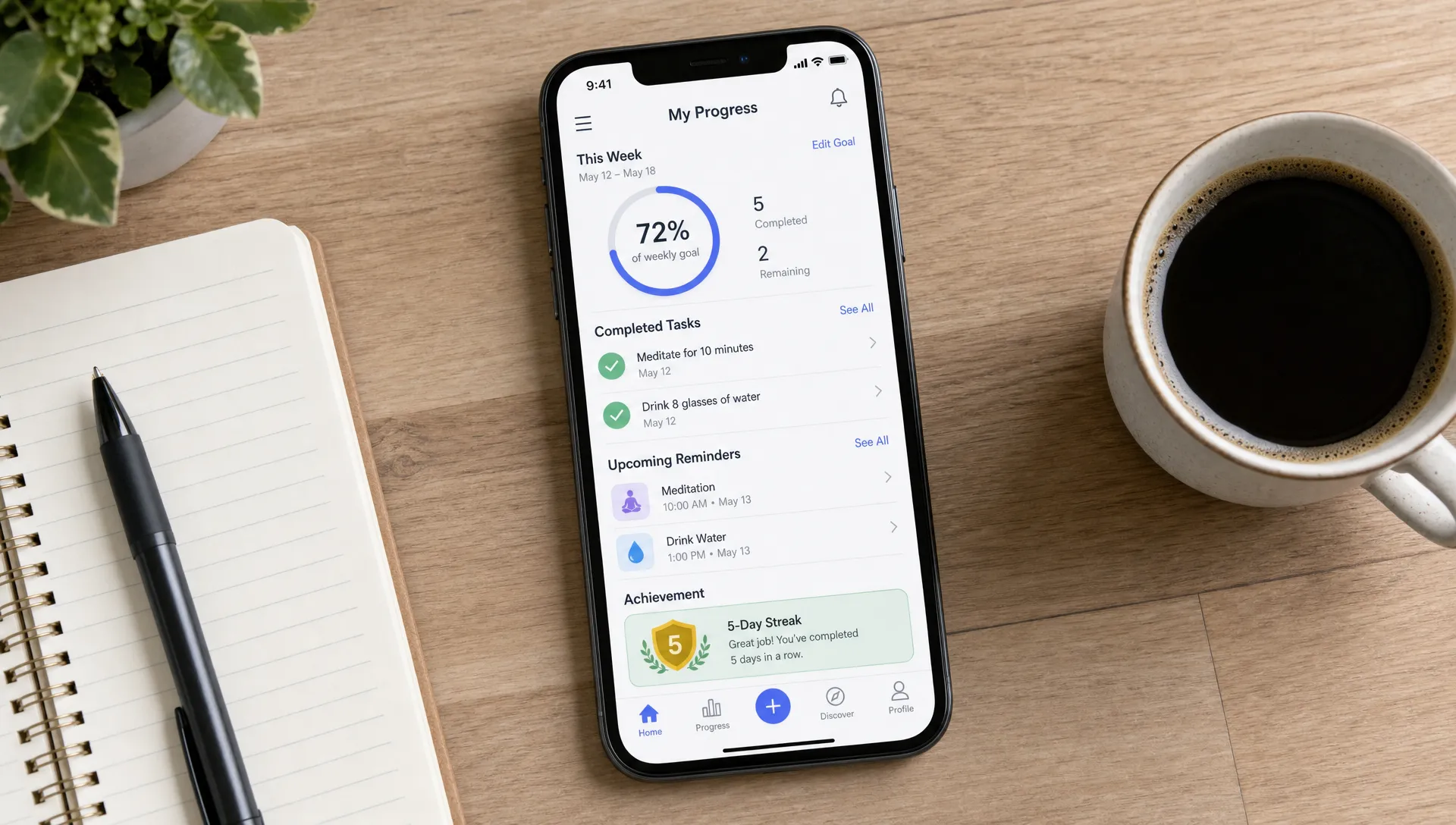
For non-technical founders, this is a useful way to keep the MVP focused. You do not need advanced analytics in the first release if the user cannot even see their own progress. Start by showing the user what they have done, what is next, and why it matters.
4. Saved history and continuity across sessions
A companion app becomes more valuable when it remembers what happened before. That memory creates continuity, which is one of the main reasons users come back.
Think about the difference between an app that treats every visit like the first visit and one that says, “Welcome back, here is where you left off.” The second experience feels personal, even when the feature itself is simple.
Useful history features include:
-
Recently viewed items or previous sessions
-
Past bookings, jobs, lessons, workouts, or purchases
-
Notes, uploads, or photos connected to a task
-
Drafts that users can continue later
-
Status updates that show what has changed since the last visit
For service businesses, this can be especially powerful. If your team currently runs on paper forms, text messages, or scattered spreadsheets, a mobile app that stores job history, customer notes, and task status can save time while improving customer experience.
For founders, saved history also creates future product opportunities. Once users have meaningful records inside the app, they have a stronger reason to keep using it.
5. Fast core actions with minimal taps
Retention is often about speed. If users need five screens to complete a repeated task, they will eventually stop using the app.
A companion app should make the most common actions obvious and quick. This may sound basic, but it is where many MVPs fail. Founders often spend too much time on impressive features and not enough time reducing taps in the daily workflow.
Ask this question for every recurring action: how many steps does it take today?
A few high-retention shortcuts might include:
-
One-tap check-in
-
Resume last session
-
Rebook previous appointment
-
Start today’s task
-
Repeat last order
-
Upload job photo
-
Mark task complete
-
Message support or team member
Speed matters most for users who are busy, mobile, or working in the field. A technician standing outside a customer’s home does not want a complicated menu. A student between classes does not want to rebuild a study session from scratch. A customer booking a familiar service does not want to enter the same details every time.
Design the app around repeat behavior, not just first-time discovery.
6. Useful personalization beyond the user’s name
Personalization is not just “Hi, Sarah.” In a strong companion app, personalization changes what the user sees, what the app recommends, and what action comes next.
The right level of personalization depends on the product. For an early MVP, it can be simple rules rather than complex AI. For example, show different home screens for admins and staff, recommend a review topic based on missed questions, or place the next booking button near the top for returning customers.
Personalization can be based on:
-
User role
-
Past behavior
-
Saved goals
-
Upcoming schedule
-
Location or service area
-
Skill level or preferences
-
Incomplete tasks
Be careful not to over-personalize too early. If the app feels unpredictable, users may lose trust. Start with transparent personalization, such as “Based on your last session” or “Because your appointment is tomorrow.”
7. Offline and low-connectivity support where it matters
Not every companion app needs offline mode. But for trades, field service, logistics, fitness, travel, events, and on-site work, unreliable connectivity can break the experience.
If your users are likely to be in basements, gyms, warehouses, rural job sites, schools, or moving vehicles, consider what the app should still do without a stable connection.
Offline-friendly features might include viewing saved job details, completing checklists, taking notes, capturing photos, or saving form entries until the device reconnects. Even partial offline support can make the app feel more dependable.
For an MVP, the key is to identify the mission-critical offline action. You may not need the entire app available offline. You may only need users to complete the main task without losing data.
8. In-app feedback and support pathways
When users get stuck, they either ask for help or abandon the app. A companion app should make support easy, especially during the first few weeks after launch.
This does not mean building a full help center in version one. A simple support path can be enough. Let users report a problem, send feedback, request help, or contact the business from inside the app.
For startup founders, in-app feedback is also a product research tool. Early users will tell you where they are confused, what they expected, and which features matter most. That feedback can shape the next release far better than guesswork.
The best feedback prompts are contextual. Do not ask for a review immediately after signup. Ask after a successful booking, completed session, solved task, or repeated use. That timing gives users something real to respond to.
9. Trust features that reduce hesitation
People come back to apps they trust. Trust is not one feature. It is the result of clear design, predictable behavior, strong privacy choices, and reliable performance.
For a companion app, trust features may include secure login, clear permissions, transparent data use, confirmation screens for important actions, and easy ways to edit or undo mistakes. If users upload photos, notes, health details, customer information, or payment-related data, trust becomes even more important.
The Android developer documentation on notification runtime permission is a good example of how mobile platforms increasingly expect apps to ask for access thoughtfully. Users want control, and platforms are designed to protect that control.
Trust also comes from performance. If the app crashes during a job, loses progress during a session, or takes too long to load, users may not return. Clean code, good testing, and a realistic MVP scope are retention decisions, not just technical decisions.
10. Habit-building features that match the product
Habit features can be powerful, but they should fit the app’s purpose. Streaks, badges, and rewards work well in some companion apps, but they can feel childish or irrelevant in others.
Use habit mechanics when they reinforce the user’s actual goal. A study app can use streaks to encourage daily practice. A wellness app can celebrate consistency. A loyalty app can reward repeat visits. A field operations app may not need badges, but it may benefit from task completion status, team accountability, and end-of-day summaries.
Here is a practical way to choose habit features:
| Product type | Habit feature that may fit | Feature to be cautious with |
|---|---|---|
| Study or learning app | Streaks, review reminders, topic mastery | Too many badges without real learning value |
| Fitness or wellness app | Weekly goals, progress charts, milestones | Shame-based reminders or unrealistic goals |
| Local business app | Loyalty rewards, rebooking prompts, visit history | Excessive discount notifications |
| Field service app | Task completion, job status, team updates | Gamification that distracts from work |
| Social companion app | Activity feed, replies, community prompts | Notifications that create noise without value |
The point is to create motivation, not manipulation. Retention should come from value delivered, not pressure applied.
What to build first in a companion app MVP
If you are building your first version, prioritize the features that support the core loop. A lean companion app MVP might include onboarding, a personalized home screen, one core action, progress or history, notifications, and basic support.
You can likely postpone advanced gamification, complex AI, social feeds, deep reporting, and extensive admin tools unless they are central to the product. Every extra feature adds design, development, testing, and maintenance time.
For non-technical founders, the better question is not “How many features can we build?” It is “Which features prove users will come back?”
A strong MVP should answer these questions:
-
Do users understand the value quickly?
-
Do they complete the main action?
-
Do they return without manual chasing?
-
Do reminders help rather than annoy?
-
Do users trust the app with their information?
-
Do they ask for more of the same experience?
If the answer is yes, you have a stronger foundation for the next release.
Common companion app mistakes to avoid
Many companion apps struggle because they are built around business assumptions instead of user behavior. The result is an app that has features, but no reason to return.
One common mistake is treating the app like a digital brochure. If the app only lists services, locations, or content, it may be useful once but forgettable afterward. Add action, memory, and follow-up.
Another mistake is launching with too many disconnected features. A booking tool, chat, feed, rewards program, AI assistant, calendar, and marketplace might all sound useful, but together they can confuse users. Retention comes from a clear loop, not a crowded menu.
Founders also underestimate the importance of maintenance. Companion apps support ongoing behavior, so bugs and slow performance hurt retention quickly. This is why choosing the right development partner matters. If you are evaluating options, this guide on how to choose a mobile app developer for your startup explains what to look for beyond coding ability.
How to measure whether users are coming back
You do not need an enterprise analytics setup to learn whether your companion app is working. Start with a small set of retention signals tied to the core loop.
Useful metrics include activation rate, first-week return rate, repeat task completion, notification opt-in rate, reminder engagement, session frequency, and churn after the first use. For service businesses, you might also track repeat bookings, completed forms, customer response time, or fewer missed appointments.
The right metric depends on the app’s purpose. A daily study app should care about frequent return sessions. A local home services app may care more about rebooking or job completion. A field service app may care about task completion accuracy and time saved.
Avoid vanity metrics. Downloads do not prove retention. Account creation does not prove value. A companion app succeeds when users repeatedly complete the behavior the app was built to support.
Build a companion app users actually return to
The best companion app features are not about adding more screens. They are about helping users continue a journey, complete repeated actions, and see value over time.
If you’re planning a mobile MVP for a startup, local business, or field service workflow, keep the first version focused on retention from the start. I build cross-platform iOS and Android apps with a focus on clean code, strong user experience, and fast MVP delivery in 4-6 weeks.
To discuss your idea and what your first version should include, book a free consultation with me.