
Paperwork does not feel expensive when it is just one work order, one invoice or one carbon-copy form. It becomes expensive when your team is filling out the same information three times, calling the office for job details, losing signed forms in trucks and waiting until Friday to turn completed tickets into invoices.
For small businesses in plumbing, HVAC, electrical, cleaning, landscaping, appliance repair, home care and other field service industries, paper is usually not a single problem. It is a chain of small delays that slows scheduling, weakens communication and makes it harder to get paid on time.
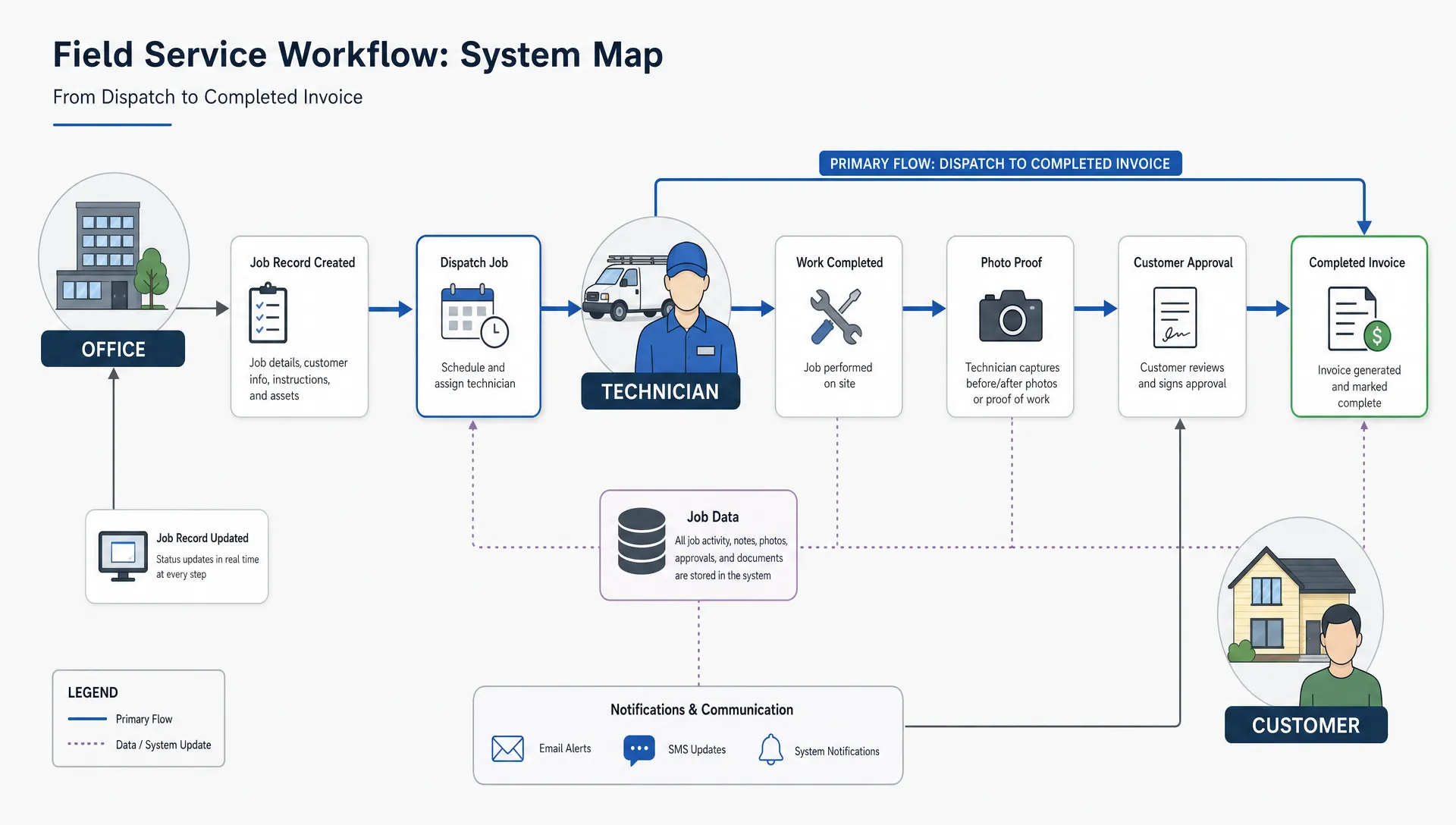
Field service apps reduce that friction by moving daily operations into one mobile workflow. Technicians can see jobs on their phones, capture notes on-site, upload photos, collect signatures and send updates back to the office without returning with a stack of forms. For owners, that means fewer missing details, cleaner records and more time spent running the business instead of chasing paperwork.
What is a field service app?
A field service app is a mobile app used to manage work that happens away from the office. It usually connects the people who schedule jobs, the technicians who complete them and the customers who need updates.
At a basic level, a field service app can replace paper work orders, job sheets, inspection forms, timesheets, customer signatures, photo records and service reports. More advanced systems may connect with invoicing, inventory, customer relationship management or accounting tools.
For a small business, the goal is not to digitize everything for the sake of it. The goal is to remove the paperwork that causes delays, mistakes and duplicate admin work.
Why paperwork creates bigger problems than most owners realize
Paper-based operations often survive because they are familiar. A technician knows how to fill out a form. An office manager knows where the folders are. The owner knows which clipboard lives in which truck.
The problem is that familiarity hides waste.
A paper job sheet has to be written, carried, protected, returned, interpreted, filed and often retyped. If handwriting is unclear or a required field is missing, someone has to call the technician or customer to fill the gap. If the form is misplaced, the business may lose proof of work, delay invoicing or disappoint a customer who expected a fast follow-up.
Paper also makes it difficult to see what is happening during the day. The office may not know whether a technician is delayed, whether a customer approved extra work or whether parts were used from truck stock. That lack of visibility creates more phone calls, more interruptions and more end-of-day cleanup.
For small teams, this matters because admin time is limited. The person answering calls may also be scheduling jobs, preparing invoices, handling payroll and following up on leads. Every unnecessary form adds pressure to an already busy day.
How field service apps eliminate paperwork in daily operations
A good field service app does not simply turn a paper form into a screen. It changes the flow of information so details are captured once, at the point of work, then reused across scheduling, reporting, invoicing and customer communication.
Digital work orders replace printed job sheets
Instead of printing or texting job details, the office can assign a work order that appears in the technician’s app. The technician sees the customer name, address, job description, scheduled time, contact details and any notes from previous visits.
When the job is complete, the technician updates the same digital record. There is no need to bring a sheet back to the office or retype the same details into another system. The job record becomes the source of truth.
This is especially useful for businesses with multiple technicians or changing schedules. If a job is reassigned, updated or delayed, the information can be changed in the app rather than communicated through a chain of phone calls.
Mobile forms reduce missing information
Paper forms rely on memory and discipline. If a technician forgets to fill out a required field, the mistake is often found hours or days later.
Mobile forms can make required fields clear before a job is submitted. For example, a service report might require the technician to confirm the problem, work performed, materials used, customer approval and follow-up recommendation. This does not make the team less flexible. It gives them a cleaner checklist so the office gets the details needed to finish the job properly.
For regulated or documentation-heavy work, structured forms are even more valuable. A home health, medical equipment, safety inspection or property maintenance business may need consistent records for audits, customer disputes or internal quality checks. If the app captures personal or health-related information, privacy requirements such as HIPAA or GDPR should be considered early in the planning process.
Photos, signatures and notes stay attached to the job
Field service work often depends on proof. A technician may need to document a damaged part, show before-and-after photos, record a customer approval or confirm that a job was completed.
With paper, this information usually lives in separate places. Photos are on a phone. Signatures are on paper. Notes are in a text message. The invoice is somewhere else.
A field service app can keep these records attached to the job. That creates a cleaner history for the office, the technician and the customer. If a customer calls two months later, the business can review the job record instead of searching through folders, phones and email threads.
Time tracking becomes part of the workflow
Timesheets are another common paperwork burden. Technicians may write hours on a weekly sheet, text start and finish times or estimate labor after the fact. That creates room for errors and delays payroll or job costing.
A mobile workflow can capture time at the job level. Even if the system is simple, recording arrival, completion and break notes inside the job record helps the business understand labor costs more accurately.
This does not mean every small business needs advanced GPS tracking or complex analytics. Many owners simply need a reliable way to know how long jobs took and which work is profitable.
Invoicing can start as soon as work is done
Paper often delays cash flow. If job sheets return to the office at the end of the day or week, invoices wait. If details are missing, invoices wait longer.
When job information is captured digitally, the office can review completed work sooner. Materials, labor notes, customer approvals and photos are already in the record. That makes it easier to prepare accurate invoices quickly, reduce disputes and follow up while the job is still fresh in the customer’s mind.
For many small businesses, faster invoicing is one of the clearest returns on moving away from paper.
Paper process vs field service app workflow
The shift from paper to mobile is easier to understand when you compare specific tasks.
| Business task | Paper-based process | Field service app process | Practical benefit |
|---|---|---|---|
| Scheduling | Office prints job sheets or sends texts | Jobs appear in the technician’s app | Fewer missed details and easier updates |
| Job notes | Technician writes notes by hand | Notes are typed, selected or dictated on-site | Cleaner records and less retyping |
| Customer approval | Signature on a paper form | Digital signature attached to the job | Easier proof of approval |
| Photos | Stored on technician’s phone | Uploaded to the job record | Better documentation and fewer lost files |
| Timesheets | Weekly paper forms or text messages | Time captured per job | More accurate labor tracking |
| Invoicing | Office waits for paperwork | Invoice preparation starts from completed job data | Faster billing and fewer admin delays |
| Follow-up | Staff searches files and messages | Job history is available in one place | Better customer service |
The biggest improvement is not that paper disappears overnight. It is that information stops getting trapped in paper, personal phones and memory.
Which small businesses benefit most?
Field service apps are useful when work happens in the field, job information changes during the day and the office needs better visibility. They are especially helpful for businesses that have grown past one owner-operator but are not large enough to absorb heavy admin overhead.
A two-truck plumbing business may need job notes and photo records to support invoices. A cleaning company may need checklists, client signatures and recurring schedule visibility. A landscaping business may need crew assignments, route notes and before-and-after documentation. A home service contractor may need faster quote approvals and proof that requested work was completed.
The same principle applies across industries: if your team writes the same information on paper and then someone else types it later, there is likely a better workflow.
Off-the-shelf software or a custom field service app?
Some small businesses should start with existing field service software. If your workflow is standard, your budget is limited and you need scheduling plus invoicing quickly, an off-the-shelf tool may be enough.
A custom field service app becomes more attractive when your workflow is unique, your team needs a simpler interface or your current tools force awkward workarounds. For example, a business might need customer-specific inspection forms, a private internal app for technicians, integration with a niche back-office process or a lightweight MVP that focuses only on the most painful paperwork bottlenecks.
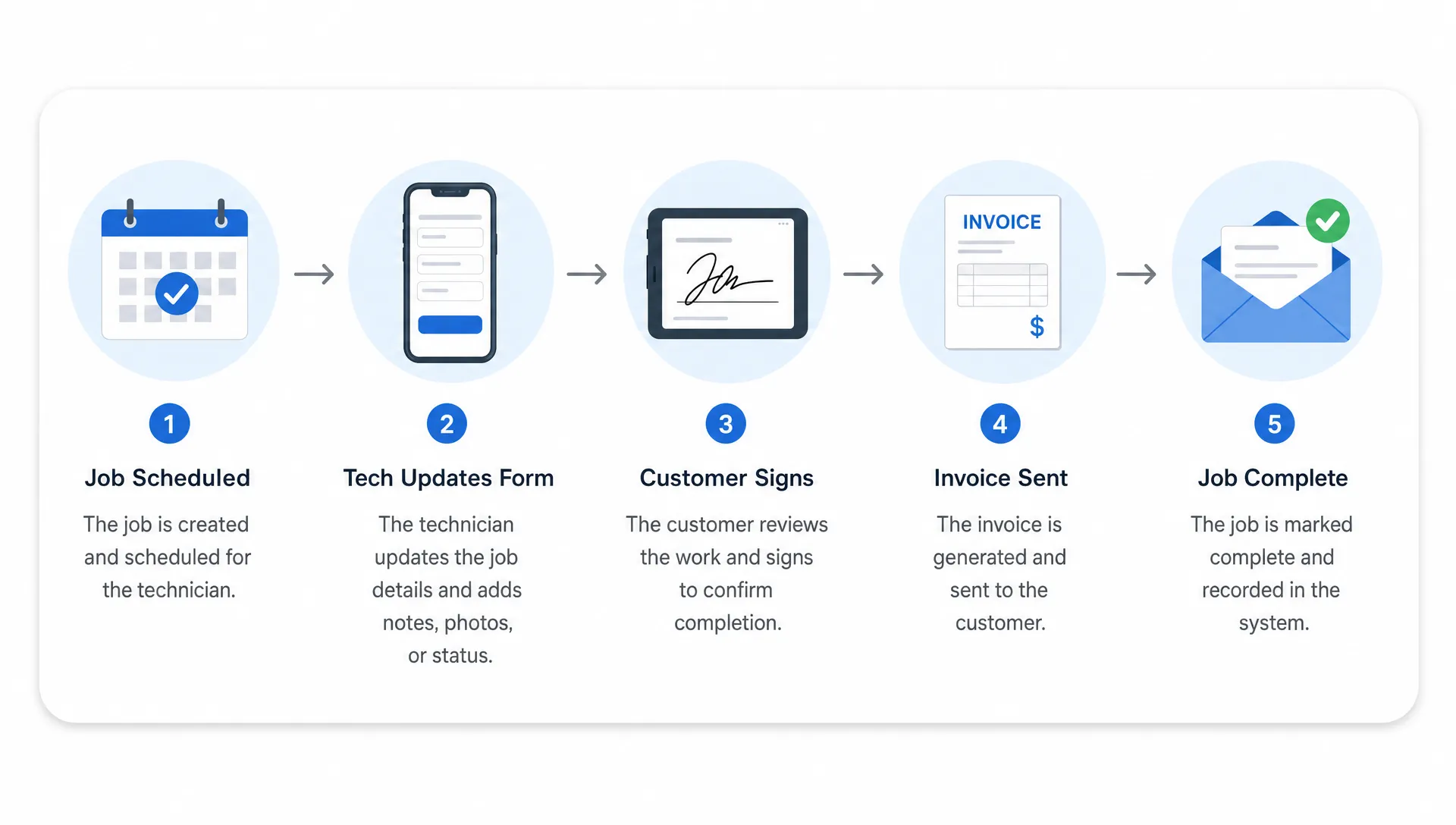
Custom does not have to mean complicated. A practical MVP can start with the core workflow: create a job, assign it, complete a form, upload photos, collect a signature and prepare the office for invoicing. More features can come later after the team proves what it actually uses.
If your technicians use a mix of iPhones and Android devices, cross-platform development can also keep the project lean. For founders and business owners comparing options, this guide on when a Flutter mobile app is the right choice explains why one codebase can be useful when speed and budget matter.
Features to prioritize first
The best field service app for a small business is usually the one the team will actually use. That means the first version should solve a few high-value problems clearly rather than trying to copy a large enterprise system.
For most small teams, the first priorities are simple:
- Job scheduling and technician assignment
- Customer and job details in one mobile view
- Custom mobile forms for service notes or inspections
- Photo uploads connected to the job
- Digital signatures or customer approval capture
- Job status updates for the office
- Exportable records for invoicing or reporting
Once those basics are working, the business can consider features such as inventory tracking, quote approvals, recurring maintenance schedules, customer portals, route optimization or integrations with accounting systems.
This phased approach matters because field teams are busy. If the first version is too complex, adoption suffers. If the first version removes a painful daily task, technicians and office staff are far more likely to use it.
How to move from paper to app without disrupting the business
Small businesses often worry that going digital will create chaos. That can happen if the rollout is rushed or if the app is built without understanding the real field workflow. A smoother transition starts with observation.
Before building or choosing software, map one complete job from first call to final payment. Write down every place information is captured, copied, delayed or lost. Pay close attention to the moments when staff say, “we always have to call the technician for that” or “we enter that again later.” Those are the best places to remove paperwork.
Next, choose one workflow to digitize first. For many businesses, that is the job completion report because it affects customer communication, invoicing and recordkeeping. For others, scheduling is the biggest pain because daily changes create confusion.
Train the team using real jobs, not abstract demos. A technician should be able to open the app, find the assigned job, complete the form and submit proof of work without needing a manual. If the workflow is not that clear, simplify it before adding more features.
Finally, keep a short transition period where paper is available as a backup but not treated as the main system. If everyone keeps using paper “just in case,” the business never gets the full benefit of digital records.
Where automation fits into field service operations
Once paperwork is under control, many small businesses start looking at the next bottleneck: communication. Missed calls, late callbacks and incomplete intake notes can create the same kind of admin drag as paper forms.
A field service app can handle the work after a job is created, but lead capture and call handling may need their own workflow. If missed calls are costing you jobs, this overview of automated phone answering for small businesses explains how automation can capture basic details, route urgent issues and support after-hours coverage.
The point is not to automate every customer interaction. It is to make sure important information enters the business cleanly, then moves through scheduling, field work, documentation and billing without being rewritten at every step.
Common mistakes to avoid
The most common mistake is trying to digitize a broken process exactly as it exists. If a paper form has twenty fields but only eight are used, copying all twenty into an app adds clutter without improving operations.
Another mistake is designing the app only for the office. The office may care about reports and invoice details, but technicians care about speed, clarity and not fighting with a tiny screen in a driveway, crawlspace or job site. If the field experience is frustrating, the data coming back to the office will be poor.
Small businesses should also avoid treating compliance and security as afterthoughts. Customer addresses, phone numbers, photos and payment-related details should be handled carefully. If a business works with health information, legal requirements may be much stricter. The Federal Trade Commission’s guidance on protecting personal information is a useful starting point for understanding basic data security expectations, but regulated industries should get proper compliance advice.
Finally, do not measure success only by whether the app launches. Measure whether paperwork actually decreases. Are fewer forms being printed? Are invoices going out faster? Are staff making fewer clarification calls? Are customer records easier to find? Those are the signs that the app is solving the right problem.
What a practical MVP can look like
A field service MVP does not need every feature from day one. A focused first version might include an admin view to create jobs, a mobile technician app for iOS and Android, digital service forms, photo upload, job status updates and a simple export for invoicing.
That kind of MVP can give the business a real working system while leaving room to improve based on field feedback. After a few weeks of actual use, the owner may discover that the team needs recurring job templates more than inventory tracking, or that customer signatures matter more than route planning.
This is where working with a mobile app developer who understands MVP development can help. The goal is to build enough to remove paperwork now without locking the business into unnecessary complexity.
Ready to reduce paperwork in your field service business?
If your team is still relying on clipboards, text messages and end-of-week paperwork, a focused mobile app can make daily operations cleaner and faster. You do not need a massive software project to start. You need a clear workflow, the right first features and an app your team will actually use.
I build iOS and Android apps, cross-platform MVPs and custom mobile app solutions for startups and small businesses. If you want to explore a practical field service app for your business, book a consultation call and discuss what a lean first version could look like.